
E Publishing
Smart Book
Smart Book | Highlights

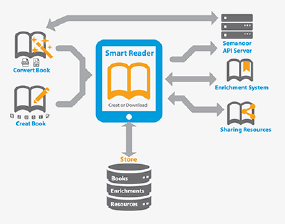
Sharing book sources through groups is also one of the best remarkable features in the Smart Book, which leads the educational process - per book level - through the creation of groups for references and sources; regardless of the main book source, as well as sharing observations and educational resources among this group members. Moreover; enrichment can be authored as additional content - or book - by any author (user) onto any original book as long as authorization of enrichment is attained by the admin for that particular user.
Smart Book provides the University with all technical requirements, training, and after-sales support to base on the University's vision and approved contract with all requested components.
Features:
- 1. Convert printed/ content into smart books (create your e-book).
- 2. Enrich an already established book/ content using the smart Book tools for authoring and recomposing.
- 3. Create content from scratch using one's own thoughts and system tools.
- 4. Share original, recomposed content, or a new content.
- 5. Sell any content as a book and generate revenue for an individual or an organization.
Smart Reader | Smart Editor
The Smart Reader is provided on app stores for tablet devices, therefore any user can download this application. After the download is complete, the user is exposed to the Book Store assigned for the project, where the learning and sharing hub is centralized for the users with their choice of uploaded books that suit them from the main Book Store, and when previewing any book Smart Reader allows to:
1. Navigating: in-between pages per book (indexing): This is done in several ways, including:
a- Book Index
b- Bookmarks
c- Pages with drawings (mind maps)
d- Thumbing
2). Search: with a distinguished browsing abilities that enables:
a- Search in the pages of the book
b- Search all books
c- Search in the public library
d- Google and others search engines: from within a page from the individual advantages in the application in the world
e- Save your favorite search results: the browser can save search results in the form of sources to learn the user can refer to them at any time and to share them with other users
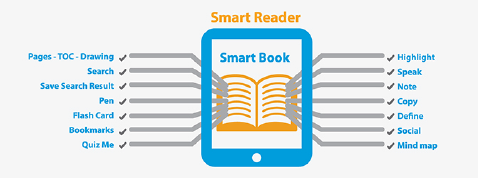
3). Smart Reader Tools: Noor Smart Reader browser provides the user with all appropriate tools, which allow him to save his notes and signs for future reference at any time, or to share with others. Tools like: Pen - Bookmark - Card Review - Shading on words - Auto Reader Voice - The inclusion of notes - Copy text - Word Definition / Translation - Sharing.
4). Advanced features: More distinguishing tools on the tools bar of Smart Reader make it more special:
a- Mind Maps: During the preview of the book 'shading' can be added to selected word/s in the book and by which the user builds his shortcut mind-map points, saves, and shares them with others. Eventually; the Smart Book Smart Reader is the only application worldwide that enables content preview based on mind-mapping.
b- Quizzes: Smart Reader offers the 'Add Quiz' tool with a wide range of ways to build a question that becomes interactive with the content meaning or reference and behave as a reminder or note user can reuse or share with others. Smart Reader enables the user to save and investigate the question tag (quiz) at any time on your book.
c- Download PDFs; where the PDF content can be posted in, analyzed, and previewed as a Smart Book in an environment that can be more useful for students on their tablets without being connected online once the PDF book is downloaded from the Book Store.
Smart Editor
Book is unique for its Smart Editor ability to edit the original book and enriches more pages to it. Through the pages preview by Smart Reader, the user can easily edit content and be part of it while preserving the original pages of the book intact, saving his version of the edited book aside, and acquiring the following advantages:

Features:
1). Editing Tools: The possibility of dealing with the original page of the book through: a- Edit all the pages of the book: or any page you want to add any enrichment on them. b- Duplicate the original page: Action recurrence of the original page and highlight any element. c- Adding a blank page and the use of authoring tools to create a new content.
2). Insert Media Tools: When you repeat the original page of the book and edit or add a blank page, you can insert: Device camera - add a picture / Add a picture from the tablet library / Add a video from the tablet camera / Add a video from the tablet library / Add a sound from the library or a direct audio recorded on the device voice-recorder
3). Insert text: Including the ability to write with a pen available.
4). Search: flexibility in the enrichment of any page reference by searching the content (text and images) online directly on Search Engines, and inserting video references into the applicable page if authorization allows.
5). Insert web pages as references: Enrichment is richer than ever with the Smart Editor; where user can insert a whole web page as a reference or diagrams or tables browsed on the Internet into his navigated page; and save them as enrichment for further use or sharing with others.
Book Authoring
The role of students' participation in the learning process through research, or learning through available resources in addition to the role of the class teacher in providing students with a schemed article and the most sources of knowledge, have all added the necessary and primary role of the authorship-feature in the Book application. Hence, the failure to provide any book material on the server becomes a difficult barrier against the user, and in this case, the Book Authoring application becomes the right tool for authoring new content by teachers and students as well, uploading them on the server, and share that content with hundreds of students and teachers. Authoring tools can be employed to build a research article, or exam references, or graduation researches, and can be applied through groups of students and under the supervision of a particular teacher, or group of students. With such an engaging platform the University will provide the appropriate innovative system to convert students into authors and teachers into explorers.
Book Enrichment
Knowledge sharing through exporting Enrichments and adding them, and importing such Enrichments on the user's Book Store at any time and due to his choice is what distinguishes the Book application most of all.
The "Create Book' process is the basic ingredient of Book, and the uniqueness of this application lies in being an enabler in 'user-participation' of whatever is produced as Enrichments by the user during the liberation of the pages of any book in Book Store or after the authoring of a new book.
The book allows users to export Enrichments and share them with other users in the group, and this process takes place through the approval of Enrichments categories by the project Admin Team or by the access features available to users by default. The Enrichments can be updated at any time, and the user can get a report on his exported Enrichments status, this feature can also be controlled so that the specialized team recreates these Enrichments and makes them available on the server so that other users select the appropriate Enrichments for them to import on their shelves.
Book Sharing

Sharing the book resources by posting share in groups. An enrichment and its sharing process needs to be approved by the competent team to ensure that it is directed towards the correct information for other users. Other users can read these enrichment pages when they become available on the Book Store that is downloaded by any user.
And the participation process within a group of students including their teacher with a supervising role is featured with sharing some notes and links on the level of any book from any source on the server. Sharing enrichments, mind-mapping points, quizzes, drawings, and notes create more creative environment for learning in the University.
Sharing Tools:
- Find sources of learning outcomes
- Mind-maps
- Quizzes
- Notes
- Drawing
- Links (search engines, websites, YouTube, etc.)